

New Feature: Video Transcription
Video feedback shows you what happened. Now Userback tells you what was said.
Every recording is automatically transcribed and summarized. Your team gets the insight whether they press play or not.
Key Features
-
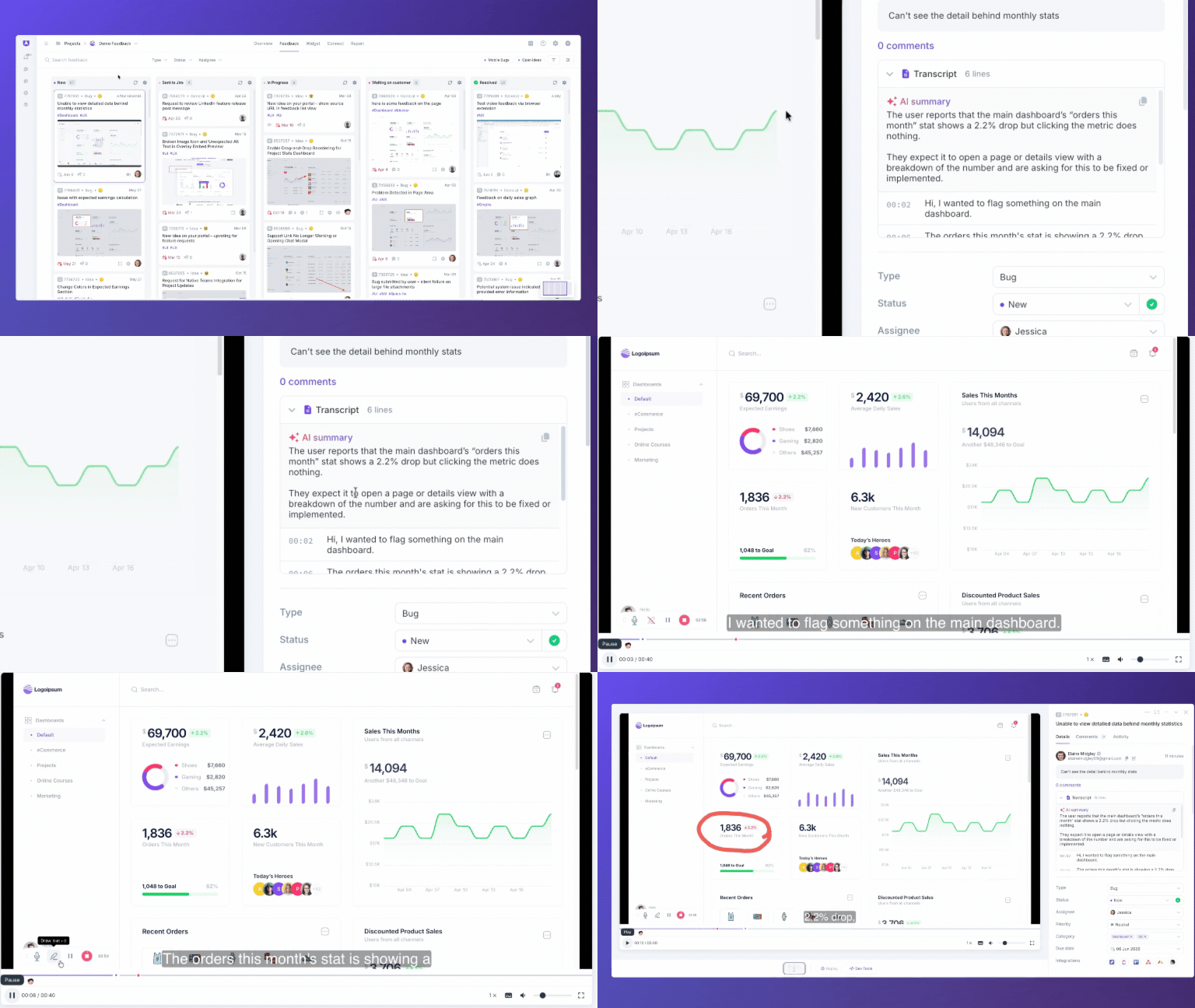
Transcript: every video feedback item is automatically transcribed. The full transcript appears in the comments panel with timestamps, so you can read through what was said without pressing play.
-
AI summary: instead of watching a three-minute video, read a short AI-generated summary that captures the overall feedback in seconds.
-
AI-generated title: each video feedback item receives an AI-generated title based on its content.
-
Searchable via AI context search: search across what users said in their recordings using AI context search.
-
Included in Insights themes: video feedback is now read and categorized alongside written feedback in your Insights themes, giving you a complete picture of what users are telling you.
-
Better device compatibility: videos are automatically transcoded to MP4 so they play on virtually any device.
How It Works
-
Video feedback is submitted through your Userback widget or Browser Extension as usual.
-
Userback automatically transcribes the recording.
-
An AI summary and timestamped transcript appear in the comments panel.
-
The transcript is included in Insights theme analysis alongside written feedback.
-
Use AI Context Search to find topics your users said in their recordings. Available on the AI package.
🎥 Your video feedback just got a lot easier to act on. Explore Video Transcripts Today!